Government meeting alerts,
in your newsroom's Slack
Local journalists can't sit in every meeting. JournoHelper watches the agendas, minutes, voting records, and press releases of the government bodies you cover — and posts what's new straight into the Slack channel where your team already works.
Already a JournoHelper user? Connect Slack from Settings → Integrations.
How it works in Slack
Follow your beats
Sign up for JournoHelper and follow the city councils, school boards, and commissions you cover. We monitor their public agendas, minutes, voting records, and press releases around the clock.
Connect Slack
From Settings → Integrations, click Connect Slack, authorize the app in your workspace, and pick the channel where alerts should land — public channels work instantly; invite the bot for private ones.
Alerts land in your channel
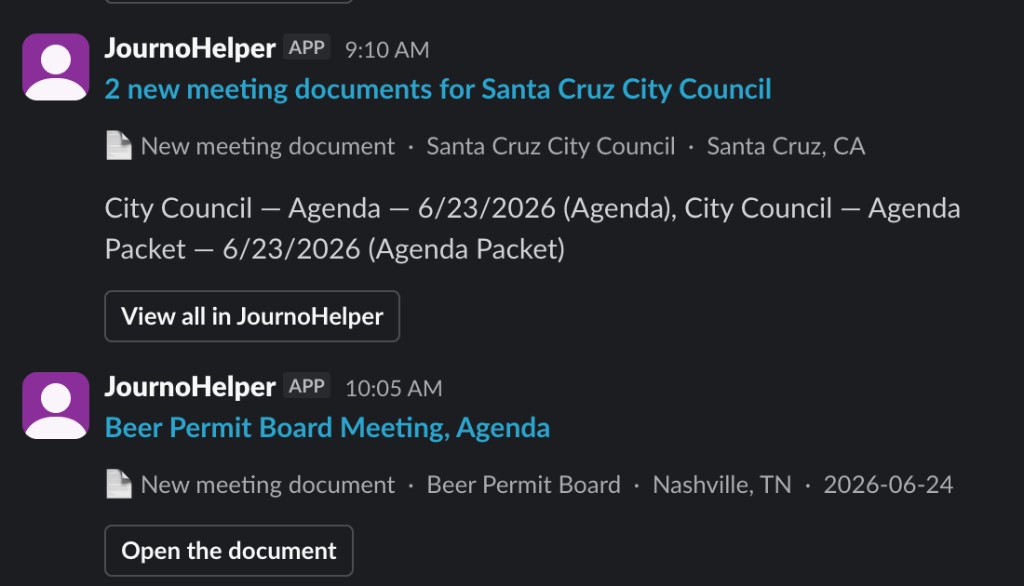
When a body you follow publishes something new, a formatted alert posts to your channel within minutes — what it is, which body, the meeting date, and a one-click link to the document and its AI brief in JournoHelper.
Minutes, not days
New agendas, minutes, voting records, and press releases post to your channel shortly after the government publishes them.
Your rules
Per-organization Slack toggles, instant alerts or email digests, and smart batching so a busy meeting day is one update.
Privacy-first
No message-reading permissions — JournoHelper can post alerts to your chosen channel and nothing more. Tokens are encrypted; uninstalling deletes the connection automatically.
Exactly what the app can do — and nothing else
chat:write & chat:write.publicPost your configured alerts into the channel you choose.
channels:read & groups:readList your channels so you can pick where alerts go.
team:readShow which workspace is connected on your settings page.
Full details in our Privacy Policy · Questions? Support